You're probably looking at a mix of card swipes, reimbursements, vendor bills, and maybe a few cross-border payouts, then trying to decide which ones need approval before month-end. If your team works across time zones or currencies, that pile gets messy fast, and the core problem isn't receipt storage, it's control. An expense management system gives finance a way to catch, approve, route, and reconcile spend before it turns into cleanup work.
For global teams, that matters even more when money moves through different rails. A business might pay someone on a card, reimburse a contractor, settle a vendor invoice, or move funds through fiat and crypto channels in the same week. A clear system turns those separate actions into one governed workflow, which is why guides like mastering business travel costs are useful when travel is part of the picture, but the bigger issue is usually broader than travel alone. If cross-border movement is part of your day-to-day, the operational layer behind it matters just as much as the payment itself, which is why teams also look at cross-border payment workflows as part of the same finance stack.
Table of Contents
- Capture that does more than store a receipt
- Limits, approvals, and integrations
- Multi-currency and crypto handling
- The real difference is governance, not just currency support
- Why convergence is the trend that matters
- What global readiness looks like in practice
Why Global Teams Need a Modern Expense Management System
A finance lead at a web3 startup can spend half a morning reconciling card swipes in three currencies, contractor invoices in stablecoins, and treasury payouts that came from a separate entity. The issue isn't that receipts are missing. The issue is that no one system is deciding what's allowed, what needs approval, and what should already be blocked.
That's where the category has changed. The expense management software market was estimated at USD 8.53 billion in 2025 and is projected to reach USD 9.29 billion in 2026 in one estimate, while another report puts 2026 at USD 8.48 billion and forecasts USD 13.82 billion by 2031 at a 10.10% CAGR according to this market estimate. Those figures point to a category that has moved far beyond bookkeeping cleanup.
From month-end cleanup to spend governance
Modern systems aren't just a place to store receipts. They're the layer that applies policy, tracks approvals, and preserves an audit trail while spend is happening, not after the fact. A good finance team doesn't want to discover a problem when the books are already late.
The operational shift matters most for distributed teams. If a contractor is in Europe, a treasury wallet sits in one jurisdiction, and the approving manager is elsewhere, a spreadsheet can't reliably coordinate the sequence. An expense management system can.
Why the global use case is different
Global businesses don't just need “expense tracking.” They need controls that work across subsidiaries, currencies, and payment methods. A team can have recurring subscriptions, vendor payments, reimbursement requests, and card spend all flowing through different channels, and finance still needs one consistent record of who submitted, who approved, and what documents were attached.
That's why the system is more than admin software. It's the governance layer that makes cross-border spend legible. For teams that pay people and vendors across borders, the win is not faster data entry, it's fewer surprises.
Practical rule: If a payment can happen in more than one currency or across more than one entity, policy has to be defined before the first transaction, not after the first reconciliation.
What an Expense Management System Does
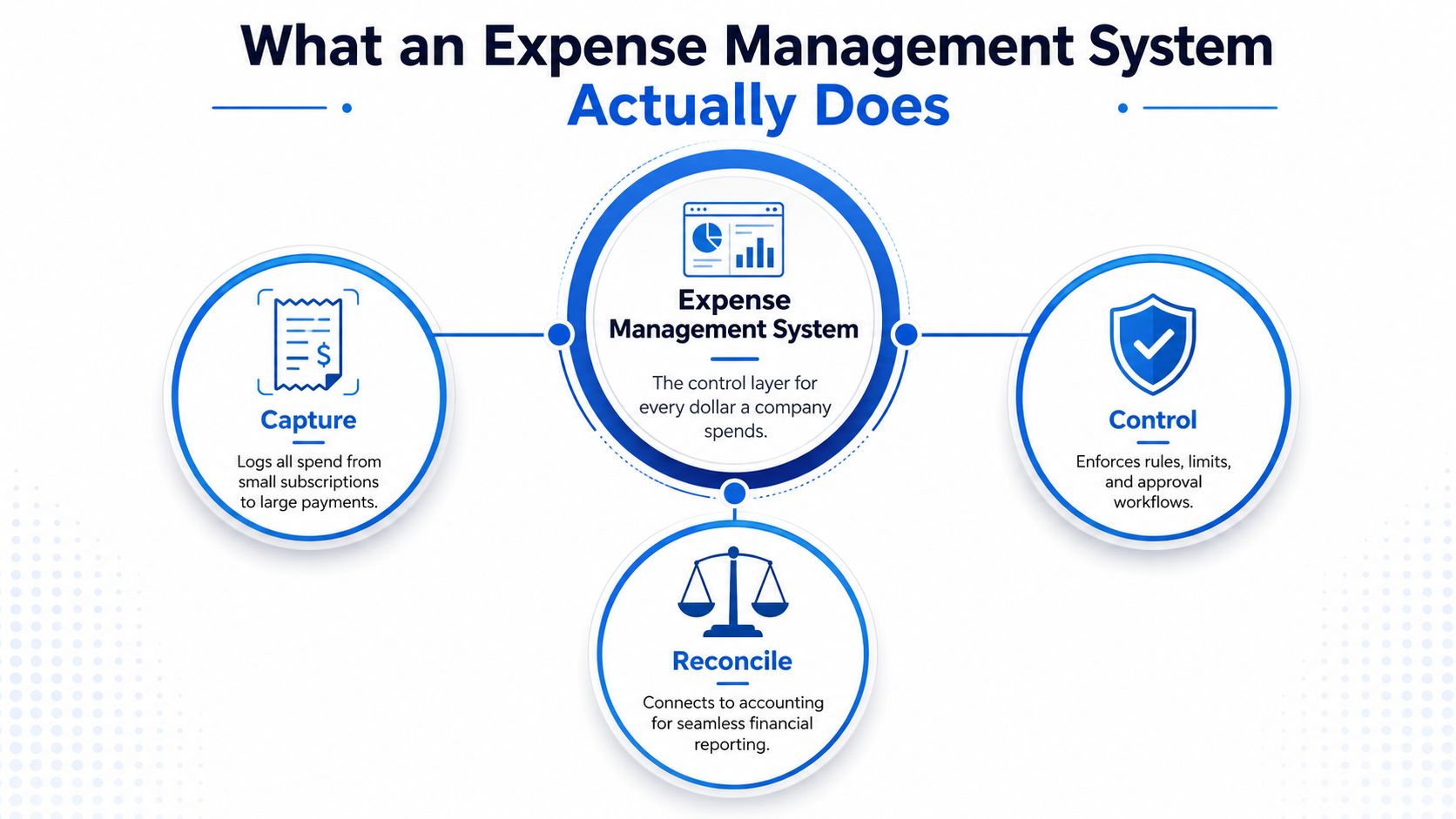
An expense management system sits between banking rails and accounting records, governing what can move before it lands in the books. Banking moves money. Cards start purchases. Accounting records the result. The system applies the rules in the middle, so finance is not sorting out preventable issues after the fact.
A modern guide describes these systems as managing the full workflow from policy setting and expense capture to approval workflows, reporting, and audit trails. It also notes that the system can track everything from a ₹200 auto fare to a ₹2 lakh client event, while logging who submitted, who approved, when, and what documents were attached in the process expense management guide 2026.
What it sits between
A finance stack usually has sources of spend on one side and the general ledger on the other. The system sits in the middle. It takes card transactions, reimbursements, and invoices, then checks them against policy before they become accounting entries.
That distinction matters because it is easy to confuse the tool with bookkeeping software. Accounting software records the result. An expense system governs the process that produces the result. Corporate cards initiate spend, but they do not enforce the workflow on their own.
For a global team, that middle layer matters even more. A contractor might submit in one currency, a treasury wallet may sit in another jurisdiction, and the approving manager could be based elsewhere. The system has to keep those steps in order so the record is still usable when it reaches finance.
What it should and should not do
It should capture receipts, route approvals, flag policy issues, and keep a clear audit trail. It should also reconcile clean data into accounting or ERP tools. What it should not do is behave like a passive archive where finance fixes mistakes at month-end.
The cleanest way to think about it is direct. Banking moves money. Accounting reports money. An expense management system controls the rules around money, and in a web3 or multi-entity setup, those rules need to exist before the first transaction posts.
The best systems reduce the number of decisions finance has to make after spend already happened.
Core Capabilities That Separate a Real System from a Spreadsheet
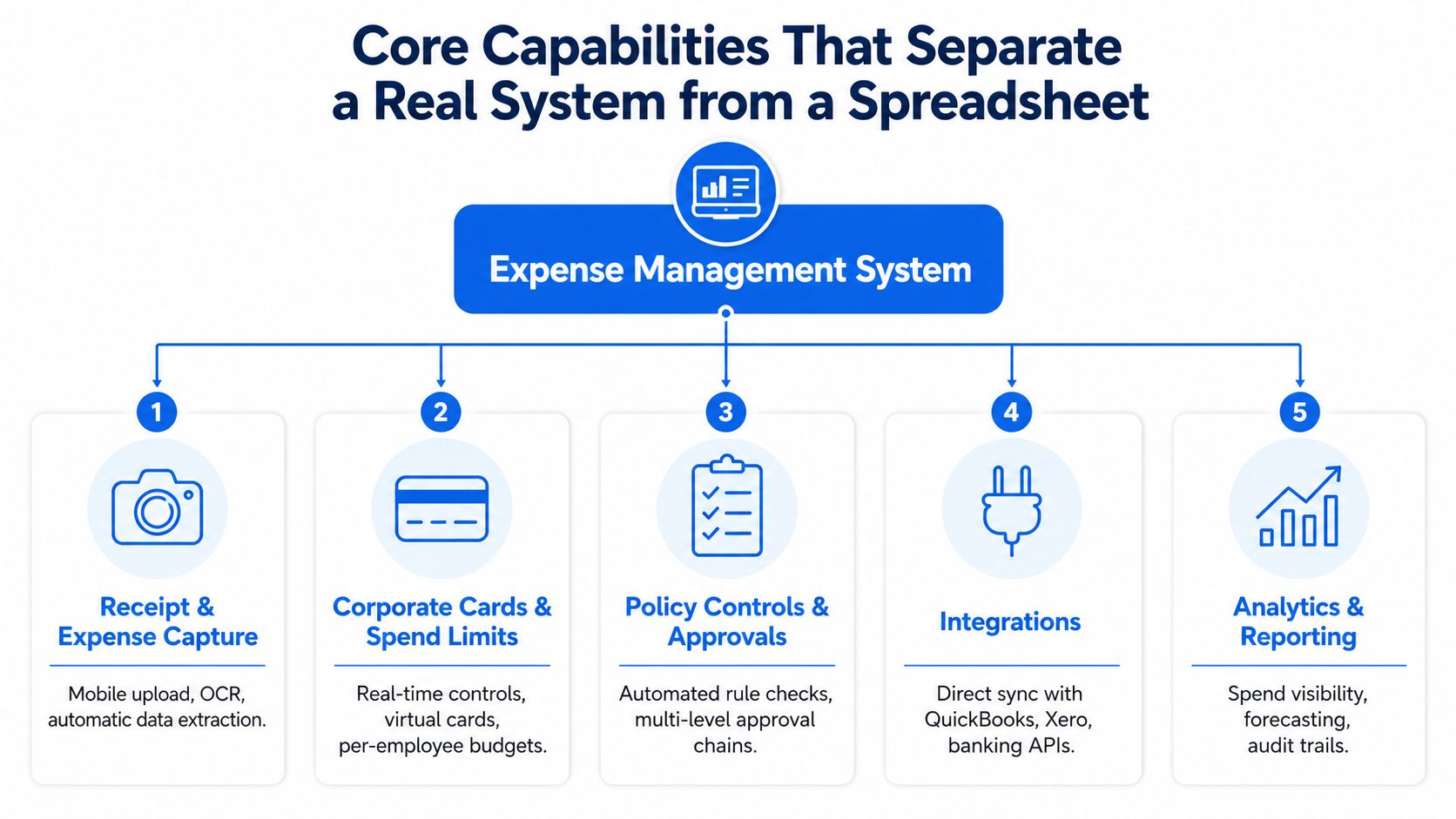
A spreadsheet can list transactions. A real system can stop bad ones from entering the workflow in the first place. That difference shows up in five places, and each one changes how fast finance can trust the numbers.
Capture that does more than store a receipt
Basic OCR reads a receipt. Better capture extracts context, matches the transaction, and flags duplicates or policy issues at submission time. That upstream validation matters because errors are corrected before they reach the approval queue or ledger sync, which reduces downstream rework expense management control loop.
Good capture also keeps submissions usable at scale. Independent product documentation shows itemized records, filtering, pagination for large datasets, audit trails, and automatic validation for multi-currency transactions, all of which matter when finance is dealing with growing spend volume expense management docs.
Limits, approvals, and integrations
Corporate cards are useful when they connect to controls, not just payment rails. Spend limits, merchant restrictions, and approval routing let finance shape behavior before money leaves the account. That's more effective than reviewing a pile of receipts after the fact.
Integrations matter for the same reason. If the platform doesn't connect cleanly to accounting and banking systems, finance ends up re-keying data or fixing mismatches later. The point is to shorten the loop from purchase to books.
Multi-currency and crypto handling
For global teams, multi-currency support isn't a bonus feature. It's part of the job. The system needs to handle settlement in different currencies and preserve clean records across those transactions.
For web3 teams, the bar is even higher. Spend can move between fiat and stablecoins, so the platform has to keep those flows tied to policy and accounting without breaking the audit trail. If a system can't do that, the finance team ends up stitching together separate tools.
How a Single Expense Moves Through the System
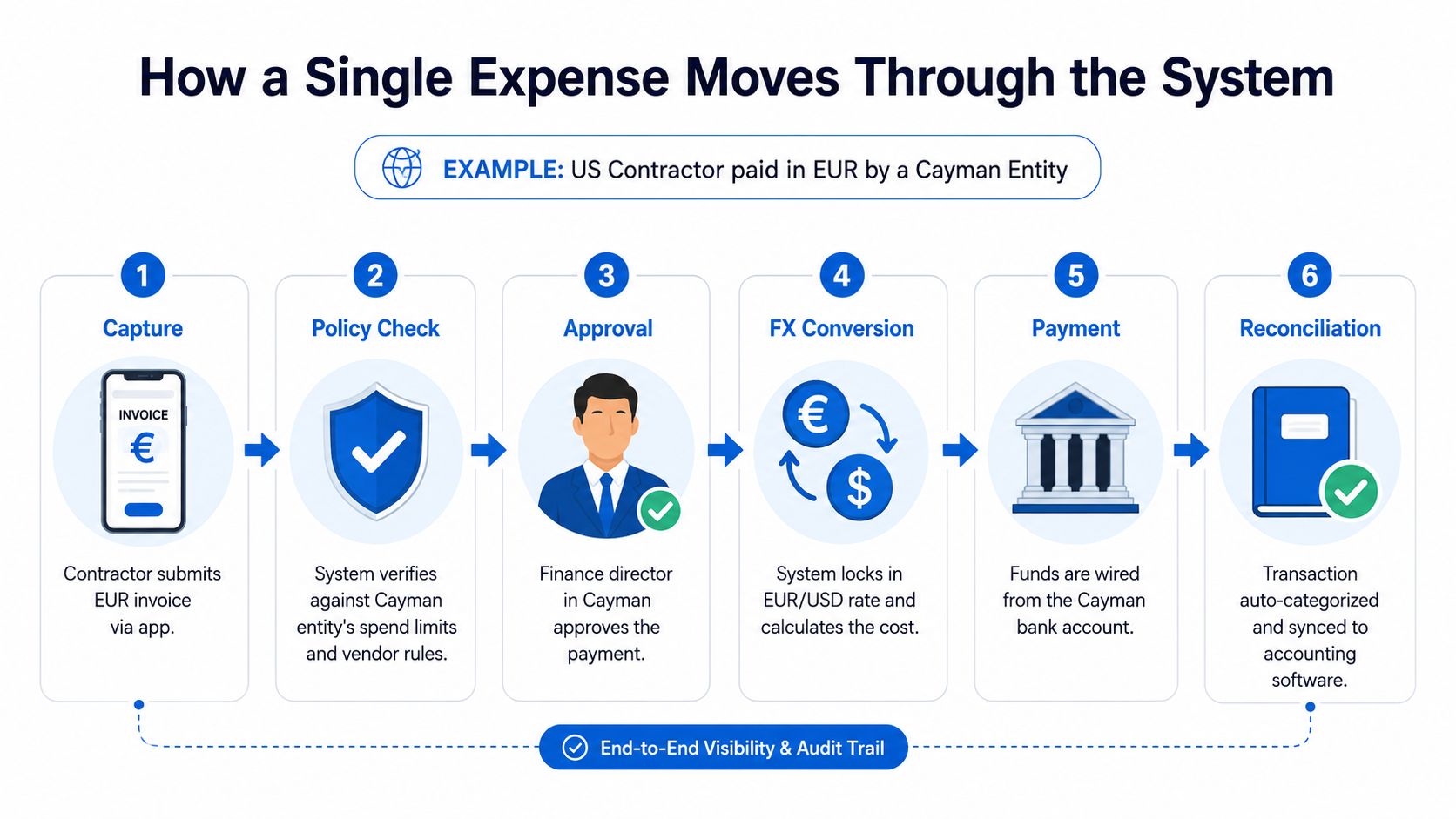
Take a realistic case. A US-based contractor submits an invoice in EUR for a Cayman entity. The business needs to approve the spend, convert it, pay it, and then sync it into accounting without losing the trail.
Step by step through the workflow
- Capture. The contractor uploads the invoice through the app or portal. Required fields, such as amount, entity, and category, are checked immediately.
- Policy check. The system compares the invoice against the Cayman entity's rules, vendor permissions, and spending thresholds.
- Approval. A finance director or manager reviews it only if it needs human judgment.
- FX conversion. The platform calculates the cost in the company's base currency and locks in the exchange rate for the transaction.
- Payment. Funds move from the correct account through the appropriate rail.
- Reconciliation. The transaction is categorized and synced to accounting with the attached documentation.
That sequence is the true value. Every checkpoint reduces the odds that finance has to chase context later.
Where the controls fire
A strong system checks for missing fields at submission, blocks purchases that break policy, and uses approval logic for unusual amounts or categories. It also keeps timestamps and document records so finance can reconstruct the full path later. That's what makes the audit trail useful.
If you want to see how fee structures can vary on the payment side, the crypto debit card fee breakdowns resource is a useful comparison point when cards are part of the workflow. It helps frame why the control layer matters, because fees, FX, and approvals all affect the final cost of spend.
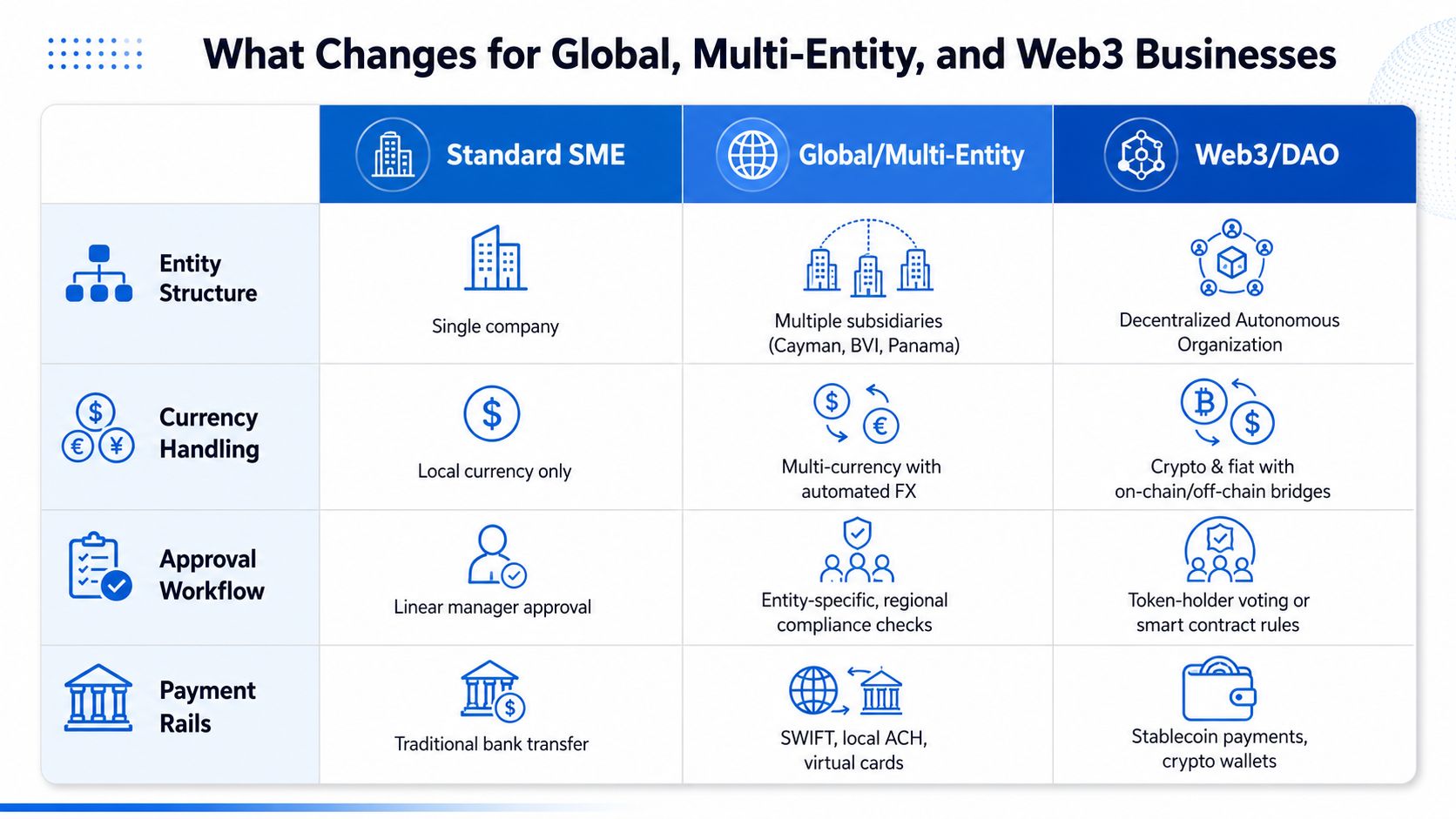
What Changes for Global, Multi-Entity, and Web3 Businesses
A standard SME usually cares about one company, one currency, and one approval chain. Global and web3 businesses don't get that simplicity. They often operate through multiple entities, move money across banking rails, and need rules that vary by jurisdiction or treasury structure.
The real difference is governance, not just currency support
Multicurrency support alone doesn't solve the problem. A company may need different approval logic for a Cayman entity, a BVI entity, and a Panama entity, plus separate controls for cards, vendor payments, and treasury outflows. That means policy design has to match the business structure, not the other way around.
Web3 teams add another layer. They may need fiat and on-chain flows in the same operational process, which means the finance team has to see all movements in one place. That's why web3 invoicing workflows matter as part of the spend stack, not as a separate niche feature.
Why convergence is the trend that matters
The most useful recent shift is the blending of expense management with corporate cards and spend controls. That moves the category away from after-the-fact reimbursement and toward pre-spend governance. A finance team can decide in advance what's allowed, who can spend, and which rails should be used.
Practical rule: Global-ready doesn't mean “supports many currencies.” It means the platform can enforce different rules, payments, and approvals without forcing finance to rebuild the workflow manually.
What global readiness looks like in practice
For an international SME, that might mean local payment support, foreign exchange handling, and accounting integration. For a crypto-native company, it can also include treasury workflows, stablecoin settlement, and controls that keep roles and limits visible to the right people. For a newly incorporated entity, onboarding and KYB speed can matter just as much as features.
The right platform should fit the structure you already have, not force you to simplify your business just to use it.
A Selection Checklist for Choosing the Right Platform
The fastest way to compare platforms is to stop looking at demos first and start with the workflow you run. If your business pays contractors, vendors, or team members across entities and currencies, the key question is whether the platform can govern those flows cleanly.
| Selection Criterion | Key Question to Ask | Red Flag to Watch | Priority for Global / Web3 |
|---|---|---|---|
| Accounting integration depth | Does it sync cleanly with your ERP or accounting stack? | Manual exports and frequent field mismatches | High |
| Policy and approval controls | Can you set rules by entity, amount, category, and role? | One-size-fits-all approval logic | High |
| Corporate card programmability | Can cards have limits, merchant controls, and approvals? | Cards that work without control layers | High |
| Multi-currency handling | Does it support settlement and reporting in the currencies you use? | Hidden FX handling or poor currency visibility | High |
| Crypto-fiat capability | Can it support on-chain and fiat flows without separate systems? | Separate wallets and accounting workarounds | High for web3 |
| Onboarding and KYB | How quickly can a startup or non-traditional entity get live? | Long manual setup and unclear entity support | High for new entities |
| Total cost of ownership | What happens when you add wires, FX, cards, and plan fees? | Pricing that hides costs behind usage | High |
The questions that expose weak platforms
A slick reimbursement demo can hide weak support for subscriptions, vendor payments, and recurring indirect spend. That's the trap. Most finance teams don't fail because receipt upload is hard, they fail because the platform can't model the actual business.
Ask how the tool handles jurisdiction-specific policies, recurring payments, and cross-functional approvals. Then ask how it behaves when spend crosses banking rails or becomes multi-entity. If the answers are vague, the workflow will be vague too.
The checklist that keeps teams honest
- Integration reality: Verify whether accounting sync is direct or just file-based.
- Policy depth: Confirm the system can differentiate by role, location, entity, and payment type.
- Fee transparency: Check published pricing for FX, wires, and card usage.
- Entity fit: Make sure the platform supports the structure you already operate in.
- Operational scope: Test vendor payments and recurring spend, not just reimbursements.
The point isn't to find the flashiest interface. It's to find the platform that can keep finance in control when the transaction isn't simple.
Implementation Playbook and How OneSafe Fits the Picture
The cleanest rollout usually starts with a needs analysis, then integration planning, then a small pilot team, and finally a broader launch with stakeholder coordination. That sequence matters because policy only works when people know how to use it, and finance only trusts it after the data lines up.
OneSafe is one option in this space for startups and web3 entities. Its onboarding and KYB process is designed for those users, with initial sign-up that's fast and typical completion within about a week, and it brings fiat banking functions and crypto transactions into a unified interface with roles, spending policies, approvals, and configurable limits OneSafe. For teams comparing options, the operational details are laid out in this OneSafe review.
The fit matters for the same reason the workflow matters. OneSafe supports multi-currency business accounts, corporate cards, USDC deposits and withdrawals, near-instant crypto-to-fiat and fiat-to-crypto conversions, web3 invoicing, and treasury workflows, which makes it relevant where spend crosses both banking rails and on-chain rails. It also publishes fee and FX details, including $10 wire deposit, $25 wire withdrawal, 0.15% fiat deposit/withdrawal, 0.35% + $50 SWIFT, and FX pricing stated at 0.25% or the FX rate, so finance can model total cost before rollout.
Use the platform that matches your entity structure, your approval logic, and your payment rails. If you're evaluating your current process or replacing a spreadsheet-driven workflow, start by mapping one real expense from submission to reconciliation, then test whether your platform can govern that path without manual patching. A call with OneSafe is a practical next step if you want to see how a unified control layer can handle global spend, crypto flows, and team approvals in one place.
A CTA for OneSafe.