You're at checkout, the card looks fine, and the terminal throws back transaction not permitted to cardholder. That message feels final, but in payment ops it usually means one thing, a permissions block, not a balance problem and not a random outage. The card is valid, the specific action isn't, and the fastest fix comes from reading the decline like an authorization problem instead of treating it like a generic “try again later” failure.
For business teams, that distinction saves time. The same card can work for one merchant, one country, or one channel, then fail in the next because the issuer, merchant setup, or card product policy doesn't allow that exact flow. If you need a quick reference on card products and controls, the OneSafe cards page gives a useful overview of how spend rules and card permissions are typically organized.
Table of Contents
- Start with the cardholder's own controls
- Then check merchant category and region
- Then look at the transaction type itself
- Then rule out platform-specific test behavior
What This Decline Actually Means
A transaction not permitted to cardholder message is a permissions answer, not a mystery. In the ISO 8583 and card-network decline framework, 57 maps to “Transaction not permitted to cardholder” or close variants, while 58 covers terminal or acquirer restrictions, which is why this isn't a generic failure message. The practical meaning is simple, the card itself is valid, but the issuer has blocked that specific type of use, such as online purchase, ATM cash withdrawal, international spending, or a restricted merchant category. See the ISO-style mapping in the decline reason and code reference.
The first thing to do is stop asking, “Is the card broken?” It usually isn't. Ask instead, “What permission is missing for this exact transaction?” That mindset changes the troubleshooting path completely, because the same card can be approved in one channel and declined in another, which is exactly why payment systems expose code-specific diagnostics instead of only saying “declined.”
Practical rule: if the cardholder's balance is fine and the merchant isn't down, treat the decline as a rule-based block until proven otherwise.
That matters most in corporate and global payment environments. Issuers often use this exact wording when the cardholder's profile, card product, or regional settings don't authorize the attempted flow. A finance or ops lead should triage it in the first 30 seconds by checking the payment channel, the merchant type, and whether the cardholder is trying something the card wasn't enabled to do. If you skip that step and jump straight to support, you're usually moving the same problem into another queue.
Reading the Decline Code Behind the Message
Pull the number, not just the message
The customer-facing wording is only half the story. What decides the fix is the numeric decline code in the terminal, gateway dashboard, or processor portal. In payment-authorization systems, code 57 usually means the issuer has restricted that card for the attempted transaction type, while 58 points to terminal or merchant limitations and 62 signals a restricted card. The practical troubleshooting guidance is to retrieve the numeric code first, then check whether the block lives with the card, the merchant account, or the terminal. That workflow is reflected in decline-code references from myPOS.
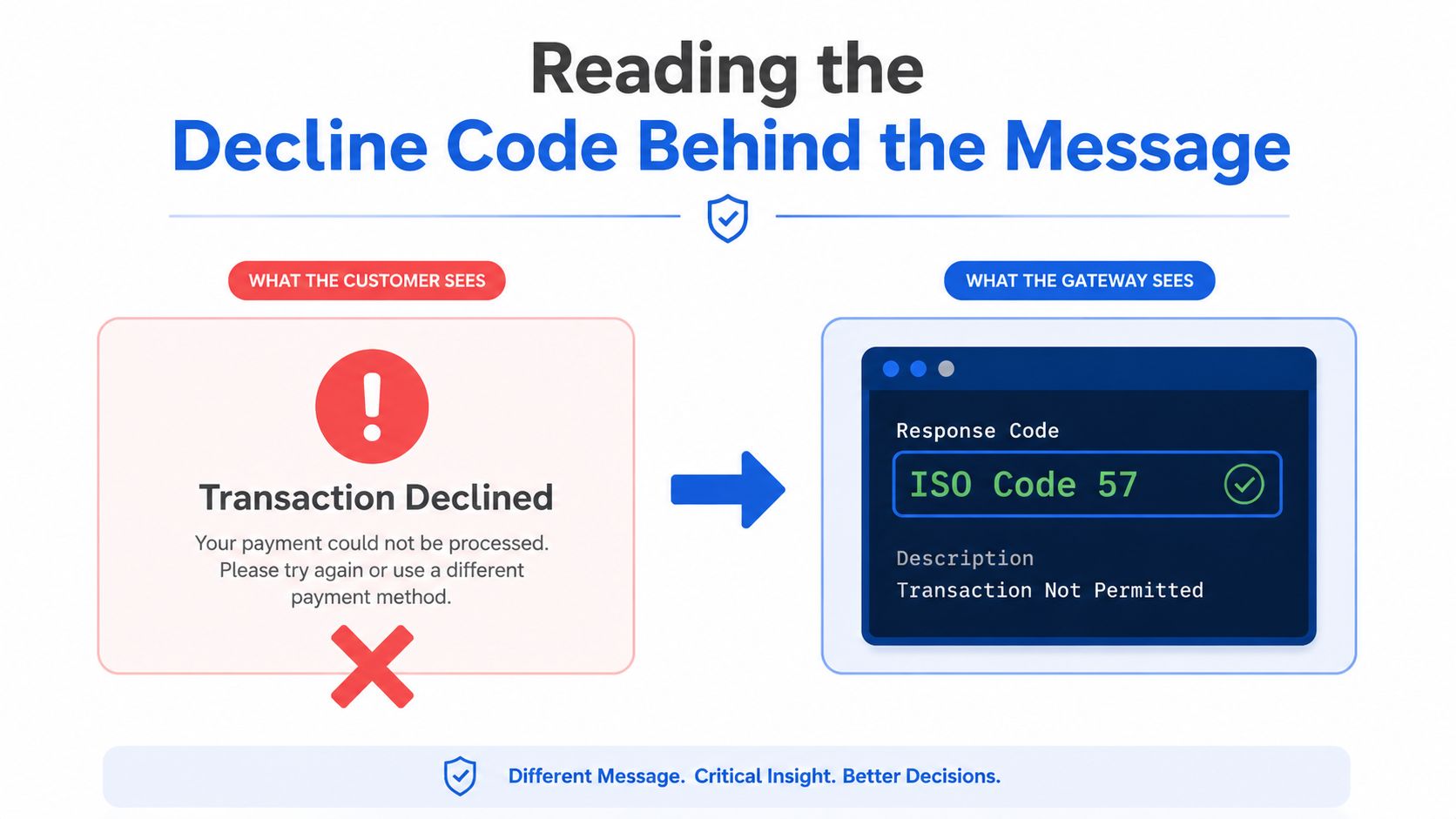
A gateway string like “transaction not permitted” is too vague to act on by itself. The code tells you whether to adjust cardholder permissions, merchant settings, or terminal configuration. Checkout.com's documentation keeps this decline in its authorization mapping, and its test-card docs also map 20057 to Transaction not permitted to cardholder, which confirms that the phrase is used as a standardized test outcome in integration environments as well as in live processing.
Why code 57 is a hard decline
Code 57 is usually a hard decline, not a transient network issue. That means repeating the same authorization with the same card and the same transaction characteristics usually wastes time and retries against the same rule. The better move is to identify which permission is missing and change the transaction, or switch the rail.
The number decides the layer. The words only tell you the symptom.
A lot of teams still misread 57 as a POS glitch or gateway outage. That's the wrong diagnosis. If the numeric code says 57, the first question is whether the issuer blocked the card product, the merchant category, the region, or the transaction type. The second question is whether the merchant is even eligible to accept that specific flow. If you answer those two questions in order, you'll avoid most of the blind retries that cause unnecessary friction.
The Most Common Causes in Priority Order
Start with the cardholder's own controls
The most common cause is still the simplest, the card wasn't enabled for the attempted flow. That can mean online spending is off, international usage is disabled, ATM access is blocked, or a corporate policy has limited certain transaction types. Decline-code references also point to merchant category restrictions and geography-based controls as common triggers, which means a card can be perfectly usable in one context and blocked in the next. For broader background on how these controls show up in corporate and global workflows, the transaction not permitted guide is useful because it treats the issue as a permissions problem, not a generic failure.
Then check merchant category and region
Merchant Category Codes matter more than most non-payment teams realize. A cardholder can be allowed to spend at a SaaS vendor and blocked at a crypto on-ramp, gambling merchant, adult-content merchant, or another MCC that the issuer or corporate policy excludes. Geography can work the same way. If the issuer's card rules don't allow that country, or if the merchant sits in a restricted market, the card can fail even though the account is healthy.
Then look at the transaction type itself
Recurring billing, cash advance, keyed entry, cashback, and cross-border flows often sit in different policy buckets. A card that works for a normal purchase may fail if the merchant tries to process a different transaction type than the cardholder or issuer allowed. The same logic applies to corporate cards with role-based permissions, where a cardholder might be allowed to buy software but not fund a prohibited category or a nonstandard payment flow.
Then rule out platform-specific test behavior
Developers and processors now use code 57 in testing and integration flows too. Checkout.com's test-card documentation shows that the phrase isn't just a consumer-facing message, it's also a standardized test outcome. That matters because a decline can reflect a real card restriction, a merchant configuration issue, or a rail-specific limitation in the platform. Treat those as separate possibilities, not one bucket with one answer.
How Card Controls, MCC, and Currency Intersect
A lot of teams debug this badly because they look at one setting at a time. In real life, card controls, MCC permissions, and currency rules stack together. A card can be enabled for foreign spend and still fail because the merchant category is blocked. It can also pass the merchant category check and still fail because the currency or region doesn't match the cardholder policy.
Consider a finance lead paying an overseas vendor invoice tied to a crypto workflow. The card may allow international settlement, but the policy can still block a particular merchant class or transaction route. That's where teams get confused. They see a valid card, a valid account, and a legitimate business expense, then assume the gateway is broken when the issue is that the card policy and the merchant profile don't line up.
The same pattern shows up in cross-border corporate spend. A company can approve SaaS spend globally, but still block a merchant that falls into a different category or a country outside the approved set. For teams handling those flows, the cleanest reference point is the cross-border payments guide, because the operational problem is usually the interaction of multiple rules, not a single toggle.
Operational takeaway: currency approval doesn't override MCC restrictions, and MCC approval doesn't override regional rules.
That's the mistake I see most often. People fix one permission, rerun the payment, and expect a different result even though the card still fails the same underlying policy. When the cardholder, merchant, and currency all look reasonable individually, the issue is usually the combination. You need to inspect the full path, not just the cardholder's settings screen.
A Prioritized Resolution Checklist Before You Escalate
A declined card with a permission code is a triage problem, not a guessing game. Start with the fastest unblock path, then work outward from the card policy to the merchant profile and, only after that, the issuer.
Use the fastest unblock path first
If the same authorization already failed once, do not keep firing it at the gateway and hope the bank changes its mind. A code like 57 usually means the rule is still in force until something about the transaction changes. Check the merchant type and currency first, then verify the card controls, then read the numeric code, and only then move the payment to another rail if the business need is still live.
- Confirm merchant type and currency. Check whether the merchant category, country, and payment method match what the card is allowed to use.
- Verify card control toggles. Review online, international, MCC, and transaction-type permissions in the card settings.
- Cross-reference the numeric code. If it is 57, treat it as a permission block, not a short-lived outage.
- Move to a fallback rail. Use another card, a wire, ACH, or another approved payment method instead of forcing the same card through again.
That fallback step saves the most time. If the transaction is legitimate but still blocked, a second rail gets the job done while someone sorts out the permission layer in parallel. In payment operations, that is the correct move, because repeated retries only burn time and keep the customer stuck.
Merchant category scrutiny deserves the same discipline. If the payment sits in a category that often gets reviewed, do not waste the cycle arguing with the decline message. Triage the control first, then the route. For teams that also touch higher-risk payment flows, the Top 1 Rank casino bonus tips resource is a useful reminder that merchant category and payment policy are tied together, even when the customer only sees a simple decline screen. Teams handling regulated or crypto-adjacent spend can use the Spanish guide to card decline handling in digital banking and crypto workflows to compare how issuer controls and merchant rules interact in practice.
If the decline still points to a policy mismatch, stop treating it like a generic card failure. Read the code, match it to the permission that is missing, then decide whether the fix belongs in card settings, merchant acceptance, or a different payment rail.
What to Gather Before Contacting Support or the Issuer
When self-serve checks don't clear the decline, resolution speed depends on the quality of the evidence you bring. Start with the timestamp, amount, merchant name, and the numeric decline code. Add screenshots of any card toggles you already checked, plus a short note confirming that the transaction fits the card's intended policy. That keeps the support conversation focused on the actual rule, not on guesswork.
If the block looks like a card-product or issuer-side restriction, contact the issuer with the numeric code and the transaction details. If the issue seems to sit in platform controls or merchant acceptance settings, contact the card program or support team that manages those controls first. The key is to route the issue to the layer that can change the permission.
A tight escalation note beats a long complaint every time. Write one sentence on what was attempted, one sentence on what the code was, and one sentence on what permission you think is missing. Support teams can act on that immediately.
Preventing Repeat Declines Going Forward
The fix is not “try harder next time.” It's better policy design. Map merchant categories to cardholder roles, pre-approve international and online usage for people who need it, and keep recurring billing on instruments meant for recurring spend. If a team is paying vendors across borders, give them a rail that fits the workflow instead of forcing every payment through a card that wasn't built for it.
That's the operational lesson behind transaction not permitted to cardholder. It's a live authorization outcome, still preserved across major processor and network documentation in 2026-era materials, so the right response is almost always configuration, permissioning, or rail selection, not blind escalation. Teams that handle payments well don't memorize every decline message. They know which layer owns the fix and move there first.
If you want a payment stack that handles cross-border spend, card controls, and treasury workflows without making every decline a support ticket, explore OneSafe. It's built for teams that need multi-currency accounts, corporate cards, and payment rails that match real operational rules. If this decline is slowing your finance workflow down, visit the site and see how much of it you can route cleanly the first time.