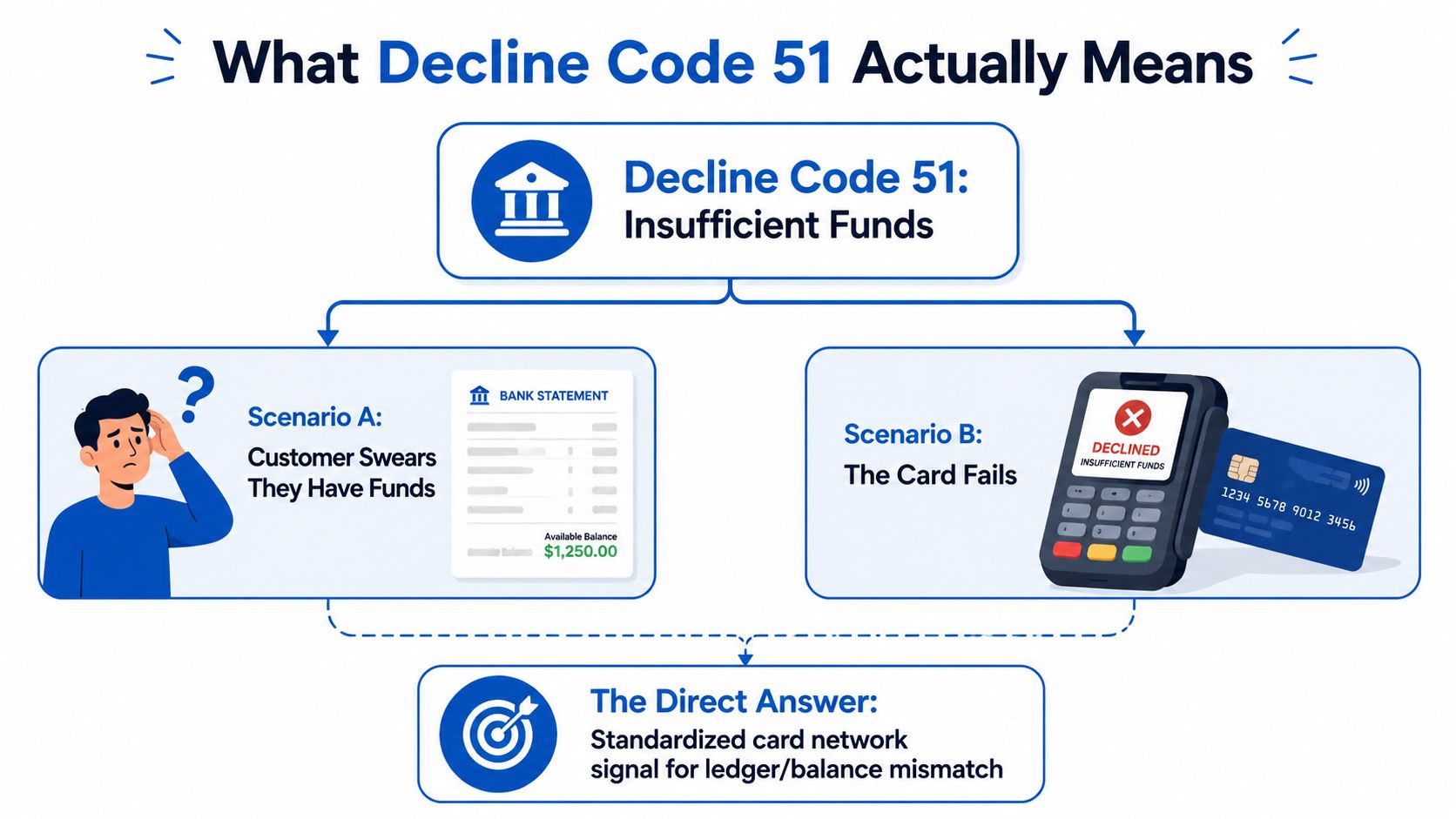
Decline code 51 is the ISO 8583 authorization response for insufficient funds, or an exceeded available credit limit on some rails. It's a soft decline, so the card generally remains valid and the transaction can succeed later after the available balance changes.
A customer may be standing at checkout insisting the money is in the account while your terminal shows a decline. Your support team sees a failed authorization, your finance team sees a possible lost payment, and nobody wants to imply that the customer can't pay. The missing detail is that issuers evaluate available balance, not the balance the customer remembers seeing.
For operations teams, code 51 is therefore more useful as a timing and liquidity signal than as a final rejection. The right response is to identify what reduced availability, offer an alternative method, and retry only when a real balance change is likely.
Table of Contents
- Step 1, compare the request with availability
- Step 2, inspect pending activity
- Step 3, choose the right action
- Step 4, communicate without judgment
- Separate issuer decisions from platform failures
- Tag every retry
- Apply the model to corporate spend
- Build an incident view
What Decline Code 51 Actually Means
A card authorization asks the issuing bank a simple question: can this card fund this amount right now? Decline code 51 means the issuer's available funds or credit are insufficient for that authorization. Stripe's decline-code reference identifies 51 as “Insufficient funds,” and describes the code within its broader list of card authorization responses. Stripe's decline-code reference also reflects the practical distinction between debit and credit cards.
For a debit card, the checking account's available amount can't cover the purchase. For a credit card, the authorization would exceed the available credit line. In either case, the issuer evaluates the account at the moment it receives the request, not according to what the customer believes the ledger balance should be.
Soft decline versus hard block
The operationally important point is that code 51 is typically a soft decline. The issuer usually isn't saying the card is canceled, stolen, expired, or permanently unusable. It's saying the current funding state doesn't support this authorization.
That distinction changes what your team should do. A hard decline normally calls for a different payment method or updated card details. A soft decline can recover after the customer adds funds, a pending hold clears, or the available credit changes. Retrying the exact transaction immediately, however, doesn't change the issuer's balance calculation, so it often produces the same result.
Practical rule: Treat code 51 as recoverable, but not immediately retryable.
The merchant can't override an issuer-side funds decision. Your gateway can transmit the request and return the response, but it can't make unavailable funds available. The customer or issuing bank must change the underlying account state.
That gives finance and support teams a clear first classification:
- Debit card: Check the available checking-account balance and pending activity.
- Credit card: Check available credit, including any authorization holds.
- Merchant action: Offer another funding source or delay the retry until the balance can realistically change.
How Card Networks and Issuers Surface Code 51
A customer taps a card, sees the request fail, and asks the merchant to try again. The terminal is only the visible endpoint of a longer authorization path. It creates the payment request, the acquirer and card network route it, and the issuing bank evaluates whether the account can fund it at that moment. The response then returns through the same chain.
The sequence is:
- The customer presents a card or tokenized payment method.
- The terminal or gateway sends an authorization request to the acquirer.
- The acquirer passes the request through the relevant card network.
- The issuing bank checks available balance or available credit.
- The issuer returns an approval or decline response.
- The acquirer and terminal show the result to the merchant.
From a payments-engineering perspective, code 51 is commonly carried in ISO 8583 field 39 on the issuer response message. The issuer's response is a decision about the account state observed when the authorization arrived, not a general statement that the card can never be used. An explanation of this response format appears in Smart Payment Solutions' guide to handling code 51.
Why the issuer owns the decision
The card network transports the message. The acquirer routes and processes it. Neither normally has the customer's live funding position, including account reservations and available credit. The issuer maintains that information and therefore makes the funds decision.
That division of responsibility limits what a merchant can fix locally:
- Restarting a terminal does not add funds.
- Switching acquirers does not remove an issuer hold.
- Re-entering payment details does not increase available credit.
- Calling a processor can confirm the response, but usually cannot reverse the issuer's balance decision.
A gateway may return both a readable decline message and the raw response code. Store both when the platform allows it. Support can use the message to explain the event, while engineering and finance can use the raw code for consistent classification, reporting, and retry rules.
The balance check is point in time
The issuer evaluates availability when the request arrives. A later transfer, released hold, settled transaction, or credit payment can change the next result, even for the same card and amount.
That timing makes code 51 useful for controlled retries, not repeated attempts. A retry should follow a plausible account-state change, such as a funding update or a settlement cycle. Payroll timing and other predictable cash movements can help finance teams define retry windows. Without that condition, an automated retry engine asks the issuer the same unanswered funding question again.
Common Triggers and Edge Cases Behind Code 51
The obvious cause is a genuine shortfall. The less obvious cause is that the customer's available balance is lower than the ledger balance because earlier activity has reserved part of the account. The explanation of response code 51 and available balance highlights why pending holds can create a decline even when the customer sees money in the account.
For example, a hotel, rental provider, subscription service, or fuel station may place an authorization hold. The funds haven't necessarily been permanently spent, but they may be unavailable for a new authorization. A customer checking a ledger balance can therefore reach the wrong conclusion.
| Trigger | What the customer sees | Who can resolve it | Typical resolution time |
|---|---|---|---|
| Genuine debit balance shortfall | The account appears funded only after recent spending is considered | Customer, by adding funds or using another method | After funds become available |
| Pending authorization hold | The ledger balance looks adequate, but the available balance is lower | Customer and issuer, often by waiting for release or reviewing the hold | After the hold clears |
| Credit availability exceeded | The credit account remains open, but the purchase would exceed available credit | Customer, by paying down the balance or using another card | After available credit changes |
| Several near-simultaneous purchases | One transaction succeeds and another fails shortly afterward | Customer and issuer, after reviewing recent authorizations | Once the account state updates |
| Large authorization amount | A card may cover a smaller charge but not the current request | Customer, by choosing another method or making funds available | When funding supports the full amount |
Why customers say they have money
Customers usually refer to the account's displayed ledger balance. The issuer's authorization system may instead subtract pending authorizations, reserved amounts, or other unavailable funds before deciding. The two figures answer different questions.
The ledger balance asks, “What has posted?” Available balance asks, “What can this account authorize now?” Code 51 is governed by the second question.
A customer can be correct about the ledger balance and still receive a valid code 51 response.
For finance teams, this distinction is more useful than asking whether the customer “has money.” Ask which balance the issuer evaluated, what pending transactions are consuming availability, and whether the requested authorization amount includes a temporary or incremental hold.
Troubleshooting Decline Code 51 Step by Step
A good diagnostic process starts with the fastest check and avoids assumptions about the customer. The objective isn't to prove that the account is empty. It's to determine whether the authorization amount exceeds what the issuer currently considers available.
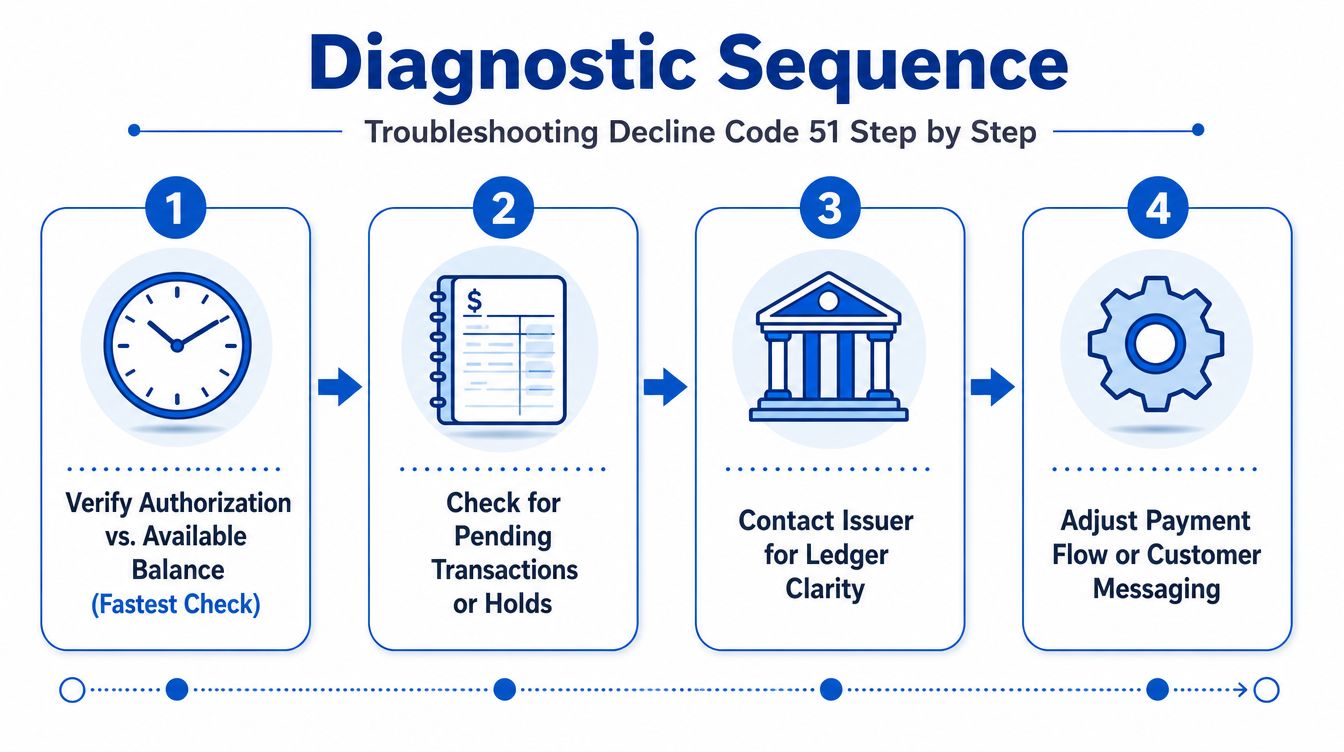
Step 1, compare the request with availability
Confirm the exact authorization amount, including any incremental amount your flow may add. Then ask the customer to check the available balance or available credit, not just the posted account balance.
For internal review, confirm that the gateway didn't send a larger amount than the customer expected. Currency conversion, tips, deposits, or an expanded authorization can create a gap between the visible order total and the issuer's requested amount.
Step 2, inspect pending activity
Ask whether the account shows pending card transactions or holds. The customer doesn't need to disclose sensitive account information to your staff. They can review the issuer's app or contact the bank directly.
Common explanations include:
- Earlier card authorizations: A previous payment may still reserve funds.
- Temporary merchant holds: A hotel, rental provider, or fuel merchant may have reduced availability.
- Concurrent purchases: Another transaction may have consumed the remaining available amount.
- Credit utilization: A credit card may be active while its usable credit is insufficient.
Step 3, choose the right action
If the customer can add funds, transfer money, pay down the card, or wait for a hold to clear, a later attempt may work. If the payment is time-sensitive, route the customer to another card, a bank transfer, a wallet funded by another account, or another method your business accepts.
An immediate retry is usually the weakest option because the issuer is likely to see the same available balance. Repeated attempts can also make your records harder to interpret, so don't let a terminal operator keep pressing retry without a customer-driven reason.
Step 4, communicate without judgment
Customer-facing staff can say:
“The bank returned an insufficient available funds response for this card. The card may still work after funds become available. Would you like to use another payment method, or check with your bank before trying again?”
That wording explains the situation without declaring that the customer is broke or that the card is defective. It also gives the customer a clear choice.
For a delayed retry, document why the retry is scheduled. “Customer expects funds to become available” is more useful than “try again later.” If the issuer confirms a hold or balance issue, use that information to select a retry window rather than relying on an arbitrary automated interval.
Logging and Diagnosing Code 51 on Payment Platforms
A code 51 response only helps at scale when the platform preserves enough context to explain the event. When a customer reports a failed payment, finance staff should be able to trace the original authorization, the issuer response, the account state at that moment, and any later recovery attempt without searching unrelated gateway events.
Begin with an event record that separates the authorization request from the issuer response. Store the processor response code, a safe payment-method token or identifier, transaction status, timestamp, amount, currency, merchant account, and a reference linking the event to its order or invoice. Keep full card data and other sensitive authentication values out of operational notes.
Separate issuer decisions from platform failures
A generic “payment failed” message can hide several different failure points. The diagnostic model should distinguish at least these states:
- Issuer decline: The issuer returned response code 51.
- Gateway rejection: The platform rejected the request before an issuer decision.
- Acquirer or network failure: The request could not complete normally.
- Merchant validation error: The request contained invalid or incomplete data.
- Post-authorization issue: An approved authorization later failed during capture or adjustment.
This classification routes the problem to the right owner. An issuer-balance issue belongs with payment operations or the customer's bank, while a gateway configuration or validation error may require engineering work.
Tag every retry
Each retry should reference the original decline and record why the new attempt occurred. Useful tags include:
- Customer added funds
- Customer selected another card
- Pending hold expected to clear
- Scheduled retry after balance review
- Manual support retry
- Automated recovery attempt
- No customer action recorded
Record the outcome of each path. A successful payment with an alternate card differs operationally from a successful retry on the original card. Both recover revenue, but they indicate different support, funding, or product issues.
Avoid one blended recovery rate that hides those differences. Segment results by payment type, customer action, issuer where available, authorization amount, currency, and retry reason. Small samples can still reveal useful patterns. Repeated failures after pending holds may call for clearer customer messages, while failures concentrated around one operational card may point to a limit or funding-policy problem.
Apply the model to corporate spend
Corporate cards and multi-currency accounts need an account-state check, not just a response-code check. Cross-reference each code 51 event with available funds, pending transactions, card-level spend limits, merchant controls, and approval policies. A decline can reflect insufficient liquidity, but it can also mean that the card is not permitted to authorize that transaction.
OneSafe combines multi-currency business accounts, global payment rails, and corporate cards with configurable spend limits, merchant controls, and policy-based approvals. During diagnosis, those controls let a finance team compare the attempted payment with the card policy and account availability, helping separate a true cash-flow shortage from a policy decline before escalating it.
Build an incident view
A practical dashboard should answer four questions:
- Which authorization failed?
- What did the issuer return?
- What account or card state applied at that time?
- What happened after the team offered a retry or alternate method?
Show finance and support teams a plain-language interpretation, while keeping raw processor data available for engineering. The view should also preserve the timing of pending holds, balance changes, and scheduled funding events. That timeline helps distinguish a genuine shortage from a temporary gap between ledger balance and spendable funds, and it gives teams evidence for choosing a retry window around payroll or settlement activity instead of relying on repeated immediate attempts.
Code 51 should become a classified workflow event, not an unexplained red banner.
Prevention and Monitoring Best Practices
Prevention starts with accepting that a ledger balance isn't a reliable proxy for spendable funds. Customers need clear guidance, while finance teams need controls that leave room for temporary reservations and scheduled obligations.

Give people the right balance language
Customer messages should use “available balance” or “available credit” and mention pending holds when relevant. That wording reduces unnecessary disputes because it explains why a visible account balance may not support the attempted charge.
Finance teams should also review whether operational cards carry enough headroom for ordinary holds, recurring expenses, and scheduled payments. A card limit set exactly to the expected invoice amount may still fail if the issuer evaluates an additional authorization or a prior reservation.
Align retries with real funding events
Industry guidance commonly treats code 51 as retryable after customer action. The operational guidance from Smart Payment Solutions on code 51 handling identifies 24 to 48 hours as a common remediation window, with timing also shaped by payroll and settlement cycles.
That doesn't mean every failed payment should retry automatically in that window. Schedule the attempt when a balance change is plausible. If payroll, settlement, or a customer transfer is expected, connect the retry to that event. Otherwise, offer another payment method immediately.
Use this checklist for a payment-health review:
- Balance visibility: Confirm that operators can distinguish ledger and available balances.
- Hold awareness: Review whether your payment flow creates temporary reservations.
- Card headroom: Leave room for pending activity on operational cards.
- Retry discipline: Suppress immediate repeat attempts unless the customer has taken corrective action.
- Decline monitoring: Track code 51 separately from gateway, network, and validation failures.
- Customer recovery: Record whether the payment recovered through retry or an alternate method.
Teams also need to protect the payment path itself. Guidance on safeguarding online payments from e-skimming attacks is relevant because secure collection and accurate decline handling are separate responsibilities that belong in the same payment operations review.
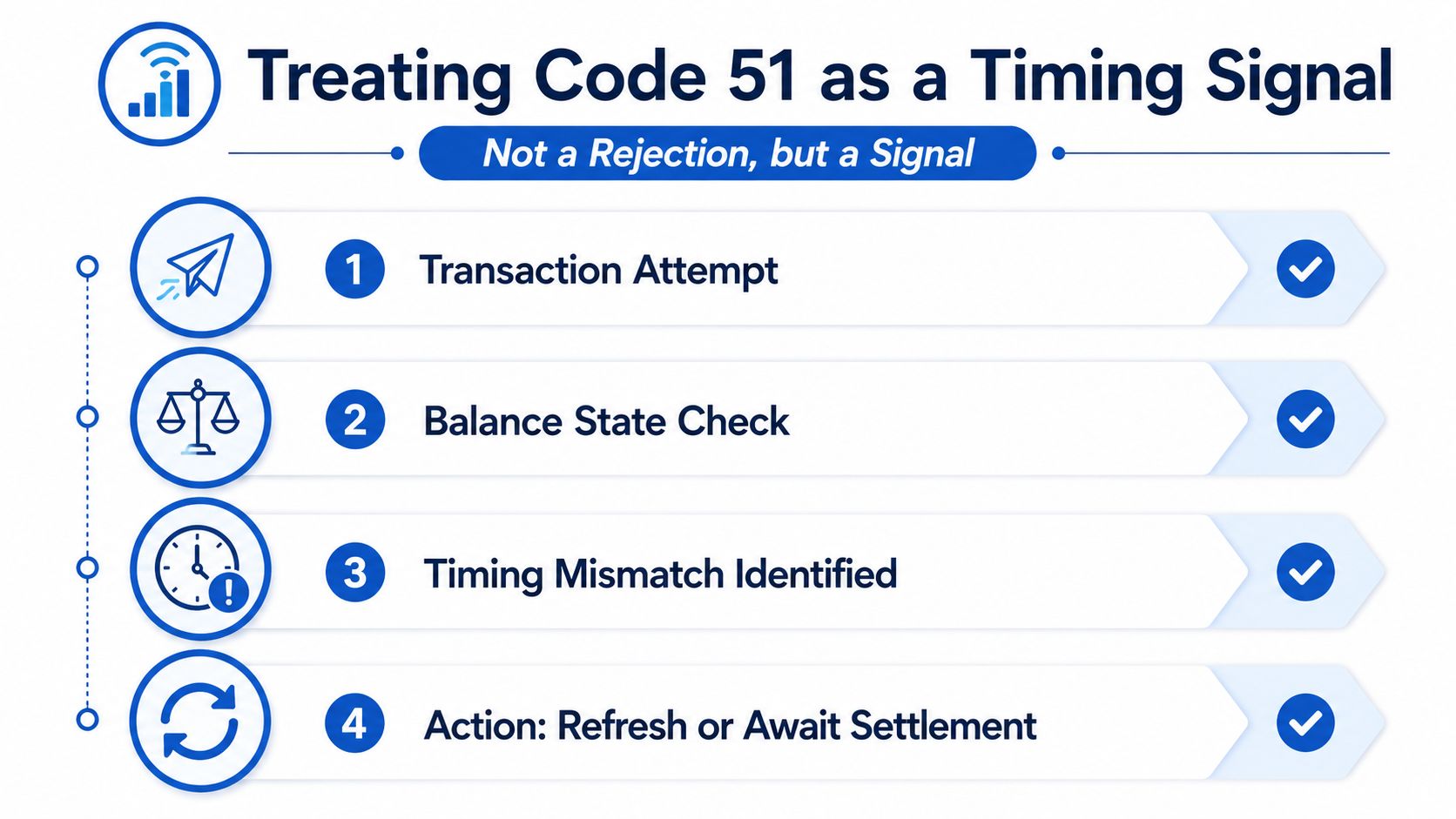
Treating Code 51 as a Timing Signal, Not a Rejection
Code 51 describes a mismatch between the transaction attempt and the account's available state at that moment. It doesn't usually describe a dead card or a permanent customer problem.
The repeatable playbook is straightforward:
- Confirm the requested amount.
- Check available funds or credit, including pending holds.
- Offer another payment method while the issue is unresolved.
- Retry only after a plausible balance change.
- Log the response and outcome for future monitoring.
This mindset also fits cross-border operations, where funding events, settlement timing, and currency availability can affect when a payment is ready to authorize. Teams managing those flows can review business-to-business cross-border payment practices alongside their own retry and reconciliation procedures.
Confirm available balance accounting for holds today, define a 24 to 48 hour retry window when the funding cycle supports it, and add code 51 to your decline monitoring. That turns an awkward failed payment into a controlled finance-ops workflow.
OneSafe provides multi-currency business accounts, global payment capabilities, and corporate cards with spend limits, merchant controls, and approval policies that help teams investigate funding and card-control issues around declined authorizations. Visit OneSafe to review the platform for your company's cross-border payment and operational spending workflows.