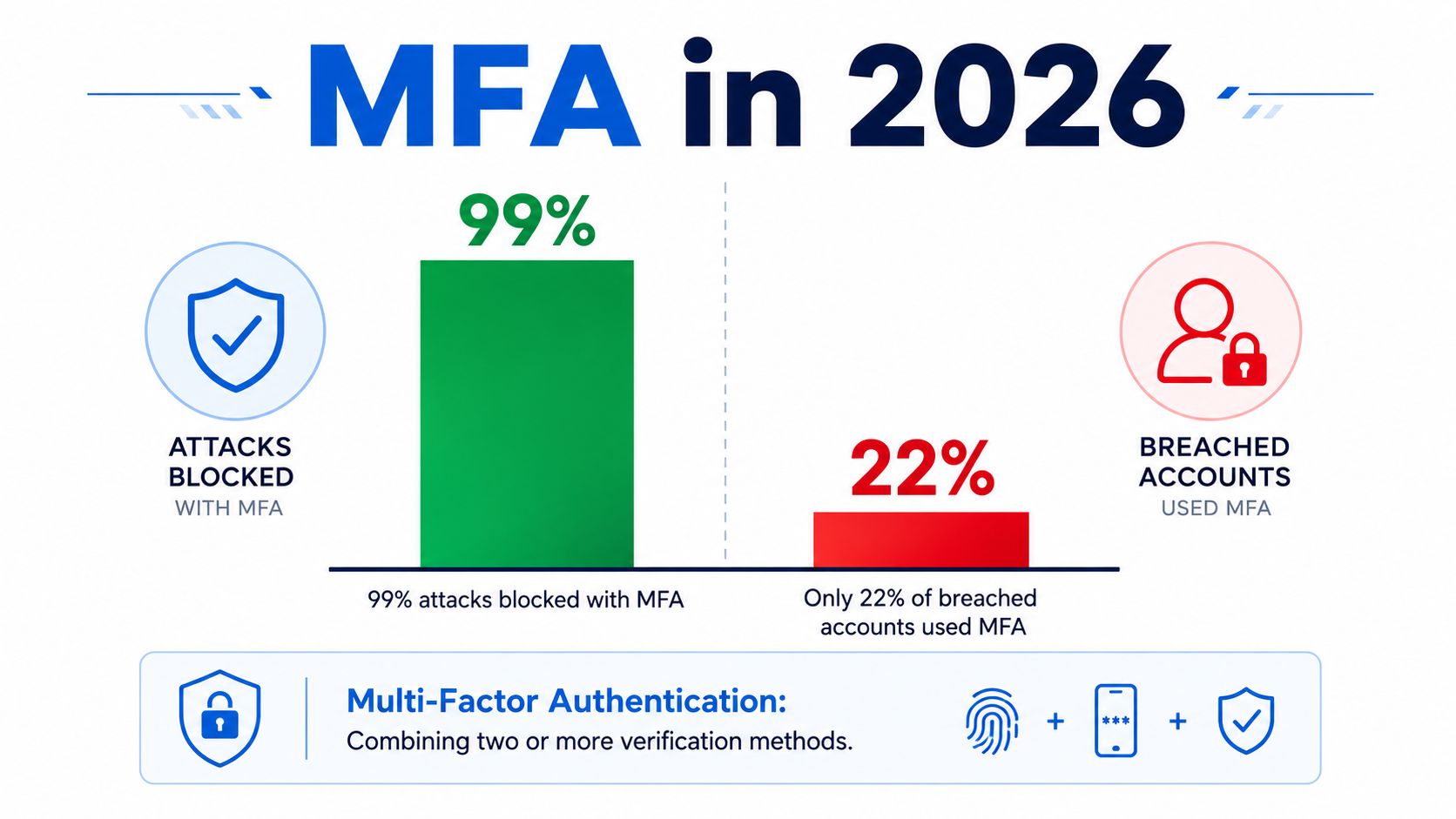
Microsoft's Azure Active Directory research associated MFA with a 99.22% reduction in compromise risk across its full population, while the same research found that more than 99.99% of MFA-enabled accounts remained secure during the observation period. Microsoft's MFA research paper makes the security case clearly, but adoption remains incomplete. Okta reported that workforce MFA adoption reached 70% by January 2025, leaving nearly one-third of users without it. Okta's 2025 workforce sign-in data reframes the practical question: what is multi factor authentication, and why does the quality of implementation matter as much as enrollment?
For a fintech founder, MFA isn't an abstract IT checkbox. It determines whether a stolen password leads to a support ticket, a compromised operator console, or an unauthorized treasury transaction. The difference comes down to the factors you choose, how you enforce them, and whether your recovery process weakens the entire design.
Table of Contents
What Multi Factor Authentication Means in 2026
Multi-factor authentication is a login process that verifies a person with at least two independent types of evidence. A password plus a code from an authenticator app qualifies. A password plus a hardware security key qualifies. A password entered twice doesn't, because both pieces belong to the same factor family.
The three core factor types are:
- Something you know, such as a password, PIN, or memorized answer.
- Something you have, such as a security key, phone, or authenticator device.
- Something you are, such as a fingerprint or facial biometric.
NIST's guidance on multifactor authentication defines MFA around two or more distinct factor types. That distinction matters because attackers who obtain a password shouldn't automatically obtain the second proof. If both “factors” arrive through the same compromised email account, they don't provide independent protection.
The NIST vocabulary in plain English
NIST separates several related ideas. An authentication factor is the category of evidence, such as knowledge or possession. An authenticator is the thing or mechanism that produces that evidence, such as a FIDO2 key or an authenticator app. An assurance level describes how much confidence the system can place in the authentication ceremony and the enrolled credential.
That last concept is where many MFA explanations become too simplistic. NIST states that higher-assurance phishing resistance depends on cryptographic authenticators with non-exportable private keys. A manually entered one-time code isn't phishing-resistant because a user can type it into a fake site, allowing an attacker to relay it to the genuine service.
Working rule: MFA tells you that multiple factor types are present. It doesn't tell you whether those factors can withstand a modern phishing campaign.
The adoption story supports that distinction. Okta recorded workforce MFA adoption rising from 35% in February 2020 to 50% in March 2020, then reaching 66% by January 2024 and 70% by January 2025. MFA has moved into the mainstream, but the remaining gap is operational and strategic. A treasury protected by SMS, push approval, or a FIDO2 key isn't protected to the same degree, even though each implementation may be labeled “MFA.”
If you're also reviewing the encryption layer around financial services, this explanation of AES-256 and quantum security in banking provides useful context. Encryption protects data in transit or at rest. MFA protects the identity attempting to access the system. You need both, but they solve different problems.
The Three Core Factor Families and Two Extensions
The easiest way to understand MFA is to think of a physical vault. The vault might ask for a memorized code, a key in your hand, and a feature unique to you. Digital systems use the same basic logic, though the strength of each mechanism varies.
Knowledge, possession, and inherence
Knowledge means something you remember. A password or PIN is the digital equivalent of a memorized vault code. It can be convenient and inexpensive, but attackers can guess it, steal it through phishing, capture it with malware, or reuse it from another breach. Knowledge is usually the weakest primary factor because it can be copied without the owner noticing.
Possession means something you hold. A hardware security key resembles a house key that opens only the intended door. A phone running a TOTP authenticator app also represents possession, although the protection depends on how the device and seed are secured. Possession is stronger than a password when the attacker can't duplicate or remotely control the device.
Inherence means something you are. A fingerprint reader or Face ID check asks the lock to recognize a physical characteristic. Biometrics can make authentication smoother, but they aren't secrets in the same way passwords are. You can replace a compromised password. You can't replace your fingerprint, so biometric enrollment and device protection still matter.
| Factor family | Everyday analogy | Practical strength |
|---|---|---|
| Knowledge | A memorized vault code | Necessary in some designs, but vulnerable when exposed |
| Possession | A physical key | Stronger when the credential is hardware-backed |
| Inherence | A thumbprint lock | Convenient, but dependent on the device and enrollment process |
NIST's terminology describes the first three as the core factor categories. Security products also use contextual signals that change how a system evaluates a login.
Location and behavior as extensions
Location evaluates whether a login makes geographic and network sense. A sign-in from a familiar region may receive less scrutiny than one that conflicts with recent activity. Location signals don't prove identity, because attackers can use residential proxies, VPNs, or a stolen device, but they can help a risk engine request stronger verification.
Behavior examines patterns such as typing rhythm, mouse movement, device use, and transaction behavior. A login may look normal while a transfer request looks abnormal. This lets a platform apply step-up authentication to a sensitive action rather than interrupting every routine session.
These extensions are useful controls, not replacements for independent factors. A familiar location can be spoofed, and behavioral profiles can be imprecise. Treat them as signals that decide when to ask for stronger proof, not as proof that a user is genuine.
For a finance team, the design question is simple: which factor protects a high-value action if the employee's password, browser session, or phone number is already under attack? That question usually moves the answer away from convenience-first methods and toward cryptographic possession factors.
Comparing MFA Factor Types Side by Side
Not every MFA method deserves the same place in your policy. The table below evaluates common approaches by whether they resist phishing, how much friction they create, how difficult recovery can become, and where they fit.
MFA factor comparison
| MFA Factor | Phishing Resistance | User Friction | Recovery Difficulty | Best Fit Scenario |
|---|---|---|---|---|
| SMS OTP | Low. Codes can be captured through phishing, SIM swaps, or number-port fraud | Low for most users | Moderate, especially after phone loss or number changes | Temporary fallback for low-risk access, not treasury administration |
| Email codes | Low. A compromised mailbox can expose both login and code | Low | Low to moderate, depending on mailbox recovery | Basic consumer workflows where risk is limited |
| TOTP authenticator app | Moderate. Codes aren't tied to the genuine site origin and can be relayed | Moderate during enrollment and device changes | Moderate, because seed recovery must be planned | Reasonable baseline for everyday employees |
| Push notifications | Low to moderate. Users can approve fraudulent prompts under pressure | Low until prompts become confusing or repetitive | Moderate | General workforce access with number matching, risk checks, and strong training |
| FIDO2 hardware key | High. Cryptographic signatures are bound to the legitimate origin | Moderate during enrollment, low during normal use | High unless backup keys and recovery procedures exist | Administrators, treasury operators, privileged support staff |
| Platform passkey | High when implemented with WebAuthn and protected by the platform | Low after enrollment | Moderate to high, depending on synced or device-bound design | Everyday users and high-value accounts where hardware keys aren't practical |
| Biometric-only flow | Depends on the underlying credential | Low | Depends on device recovery and account binding | Unlocking a passkey or local authenticator, not a standalone universal control |
The central distinction is phishing resistance. SMS, email codes, and TOTP can prove that a user has access to a channel or device, but they don't necessarily prove that the user is interacting with the genuine service. Basic push can be easier to use, yet a user may approve a malicious request after repeated prompts.
FIDO2 keys and platform passkeys form the stronger end of the spectrum because they use public-key cryptography and bind the authentication response to the legitimate origin. That makes the credential far harder for an attacker to relay through a cloned login page.
For high-value administrators, choose FIDO2 or passkeys first. Keep TOTP as a fallback for non-admin users, not as the standard for treasury control.
Regulated fintech environments and web3 treasuries should target phishing-resistant authentication for privileged accounts. Everyday employees may use TOTP where deployment constraints make stronger methods difficult, but the exception should be explicit, monitored, and temporary.
Where MFA Falls Short Against Modern Attacks
The phrase “MFA enabled” hides too much. An attacker doesn't always need to defeat the factor mathematically. They may trick the user into supplying it, steal the authenticated session after verification, or attack the recovery process instead.
Three attack paths against weaker factors
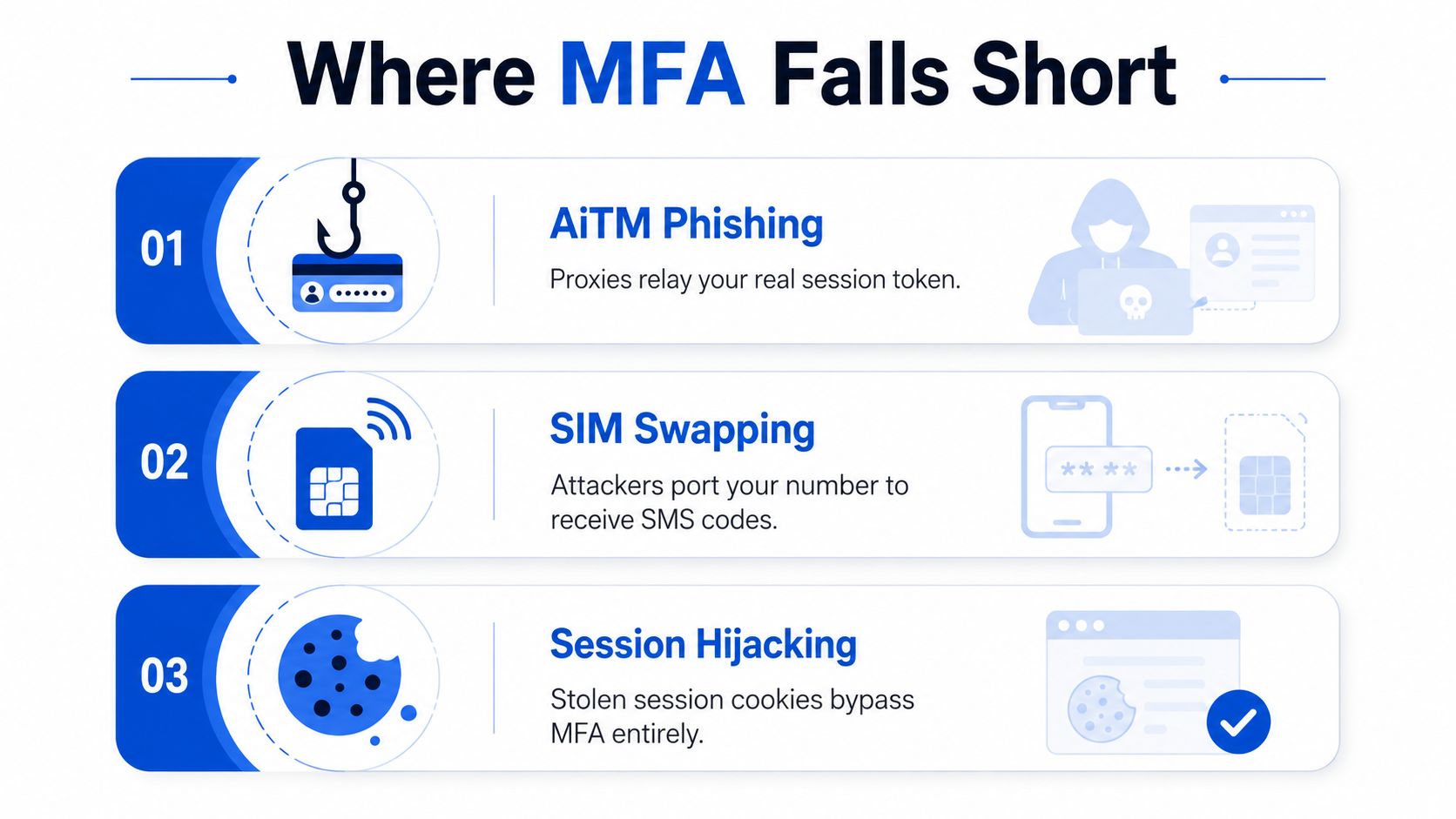
An adversary-in-the-middle phishing attack places a proxy between the victim and the genuine service. The victim opens a convincing login page, enters a password, and types a TOTP code. The proxy forwards both to the genuine service in real time, then passes the resulting session back to the attacker. The user completed MFA, but the attacker captured the authenticated session.
SIM swapping and number-port fraud target the carrier relationship behind SMS authentication. An attacker convinces a mobile provider to move the victim's number to a different SIM or account. New text messages then reach the attacker, including login codes and password-reset messages. The attacker hasn't stolen the user's phone, but the system still treats control of the number as proof.
Push fatigue, also called MFA bombing, exploits human attention. The attacker sends repeated approval prompts after obtaining the password. A tired, distracted, or confused employee eventually accepts one, especially if the prompt doesn't clearly display the request context.
These attacks demonstrate why a one-time code or approval prompt isn't automatically a strong second factor. Microsoft's research on MFA and compromise risk describes MFA as a foundational control, while the advanced cryptocurrency attack overview helps place identity attacks within the broader threat landscape facing digital assets.
Why phishing-resistant credentials change the outcome
FIDO2 and WebAuthn credentials generate cryptographic signatures tied to the genuine website origin. A fake domain can request a login, but the authenticator won't produce the same valid response for that different origin. That blocks the relay mechanism used by many AiTM campaigns.
Session theft remains a separate problem. If malware steals an already authenticated browser cookie, the attacker may bypass the login ceremony entirely. Strong MFA therefore needs endpoint protection, short-lived or re-authenticated sessions for sensitive actions, transaction controls, and alerts for unusual changes.
MFA reduces identity risk. It doesn't make an infected workstation trustworthy, eliminate social engineering, or validate a destination wallet. Your controls must protect both the sign-in event and the action that follows.
Best Practices for Rolling Out MFA in Your Organization
A rollout succeeds when security policy, identity infrastructure, user support, and recovery all point in the same direction. Start with the actions that can move money or change access, then extend coverage without creating unmanaged exceptions.
Build the policy before the prompt
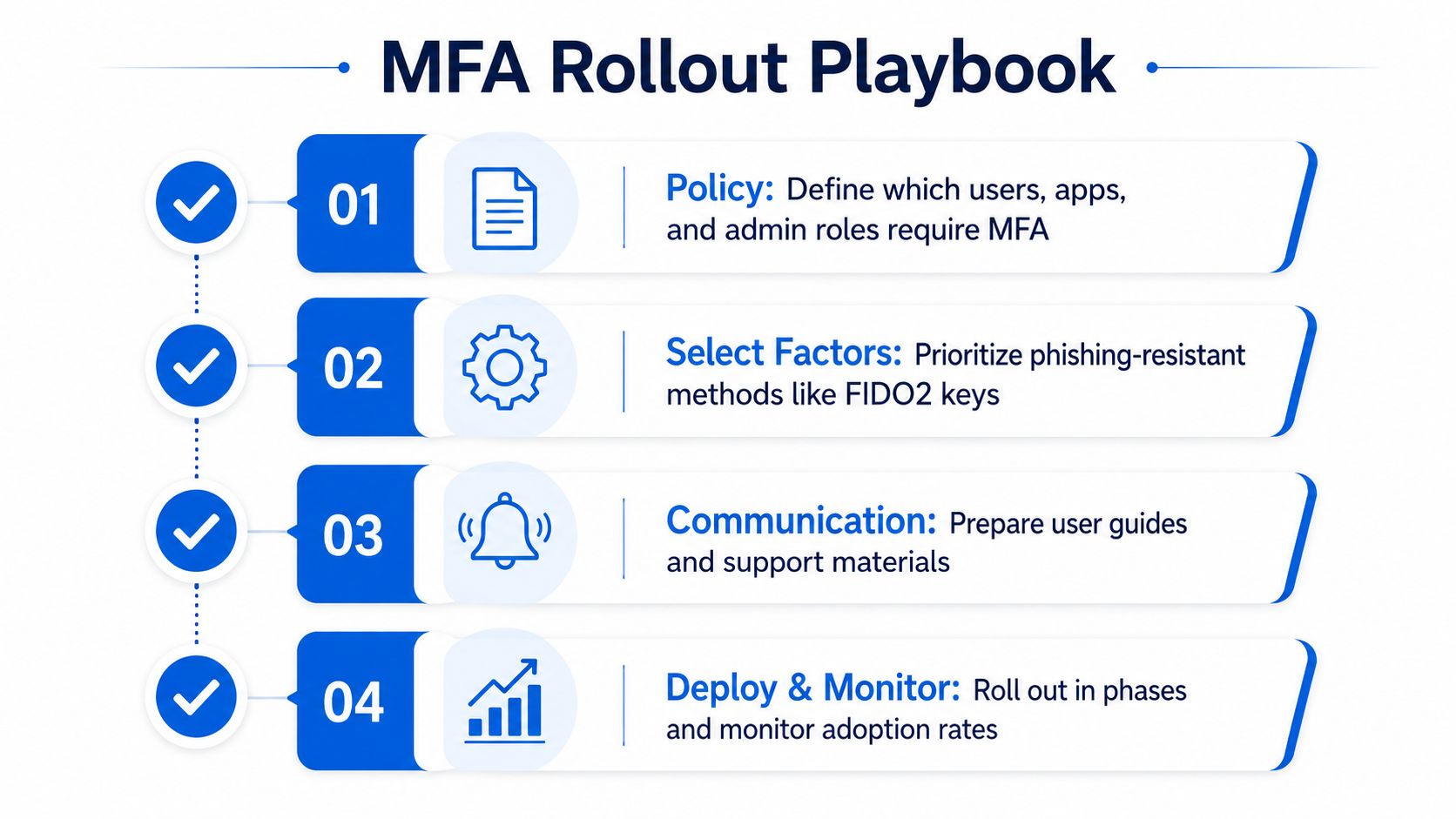
Write enforceable rules in your identity provider, not only in a wiki. Define which people, applications, devices, and actions require MFA. At minimum, include administrators, finance users, support staff with impersonation privileges, treasury operators, payment creators, and anyone who can change authentication settings.
Use step-up authentication for sensitive events. A user who already authenticated to read a dashboard may need to authenticate again before adding a beneficiary, changing a spending policy, exporting credentials, or approving a transfer. Adaptive controls can reduce unnecessary prompts while preserving stronger checks where the consequences are higher.
Choose a factor hierarchy
Set a clear default and document exceptions:
- Require phishing-resistant credentials: Make FIDO2 security keys or platform passkeys the default for administrators and treasury roles.
- Use TOTP deliberately: Offer authenticator apps as a fallback for non-admin employees when stronger enrollment isn't practical.
- Retire SMS as primary protection: Don't make a phone number the main defense for privileged or financial access.
- Centralize through SSO: Connect applications to a central identity provider so policy enforcement, offboarding, and audit records don't fragment across separate login systems.
Hardware keys such as YubiKey, Google Titan, and Feitian can support a controlled enrollment program. Platform passkeys may reduce user friction because they work with built-in device security, but your team still needs a documented process for lost devices and account recovery.
Treat recovery as part of authentication
Recovery is where strong MFA programs often become weak. Issue backup security keys for privileged users, store recovery codes securely, and create an out-of-band identity-proofing process that requires human review for high-risk accounts. Don't let a support agent disable a hardware key after a casual email request.
Use a short checklist when launching:
- Map privileged actions: Identify every route to funds, permissions, policy changes, and credential resets.
- Enroll in phases: Start with internal administrators and a small pilot group, then expand after support questions are understood.
- Communicate the reason: Explain how to recognize legitimate prompts, where to store backup keys, and what support will never request.
- Monitor coverage: Review enrollment, failed challenges, bypasses, recovery events, and exceptions on a recurring schedule.
Recovery rule: A fallback that is easier to attack than the primary factor can erase the value of the primary factor.
Teams that want a broader review can review security practices alongside their MFA rollout. Use the exercise to examine endpoint controls, access reviews, vendor permissions, incident response, and recovery ownership rather than assessing MFA in isolation.
Do require phishing-resistant factors for admins. Don't accept SMS as the primary factor for treasury access. Do test recovery with approved personnel. Don't bury recovery in email-only flows. Do audit MFA coverage quarterly. Don't treat enrollment as proof that users understand approval prompts.
MFA in Fintech, Crypto Custody, and Web3 Treasury Workflows
A compromised consumer account may expose messages, purchases, or personal data. A compromised signer in a corporate treasury can authorize an irreversible transfer of digital assets. That asymmetry changes the design target. Convenience-first MFA may be tolerable for a low-risk application, but it isn't a sound ceiling for a system that controls stablecoins, payroll liquidity, or exchange settlement.
A mature custody architecture separates several decisions:
- Operator authentication: SSO and enforced MFA protect access to the custody console.
- Policy administration: Hardware-backed authentication protects changes to roles, spending limits, and approval rules.
- Transaction approval: Multiple authorized people or hardware wallets approve transfers according to governance policy.
- Key protection: MPC custody distributes key material so one employee or one factor doesn't control the entire signing capability.
Providers such as Fireblocks are commonly used as part of institutional digital-asset custody designs, but the provider doesn't replace your identity policy. A treasury team still needs role separation, approval thresholds, destination validation, session monitoring, and a recovery process that doesn't create a hidden single point of failure.
Regulatory expectations also push financial organizations toward stronger authentication and access controls. Requirements and guidance associated with NYDFS Part 500, MAS, and the EU's DORA should be assessed against the specific entity, jurisdiction, and service scope. Don't assume that a generic “MFA enabled” status satisfies a risk-based control requirement.
For treasury access, SMS and basic push should not be the target state. FIDO2 hardware keys are a practical floor for privileged operators, while transaction-level controls add another boundary. Re-authentication or co-signer approval for a sensitive transfer can stop an attacker who obtained a valid session but hasn't satisfied the transaction policy.
The same logic applies to smart-wallet design and programmable transaction controls. This overview of smart wallets and account abstraction is relevant when teams evaluate how identity, authorization, and transaction policy interact.
OneSafe provides multi-currency business accounts, global payment rails, crypto-compatible workflows, corporate cards, and Fireblocks-based digital-asset custody with mandatory MFA. For a web3 finance team, that means identity controls and fiat, crypto, and treasury operations can be managed within a connected financial workflow, while the organization still needs to configure roles, approvals, limits, and recovery procedures appropriately.
Key Takeaways and Your Next MFA Move
Three conclusions should guide your rollout.
First, MFA works, but partial adoption leaves a material gap. Microsoft's research associated MFA with a 99.22% reduction in compromise risk across its full Azure Active Directory population, while Okta's workforce data showed adoption at 70% by January 2025. Enabling MFA for some employees or some applications isn't the same as enforcing a strong control across the paths that matter.
Second, MFA is a spectrum. SMS and basic push methods can add friction for attackers without reliably stopping AiTM phishing, SIM swaps, or approval fatigue. FIDO2 hardware keys and platform passkeys provide the stronger phishing-resistant direction, particularly for administrators, finance operators, and people who can alter custody or payment policy.
Third, treasury security is an authorization problem, not only a login problem. A strong login should lead into segregated roles, approval policies, transaction-level checks, and custody controls. The person who can access a dashboard shouldn't automatically be able to change policy and approve a transfer alone.
Actions to complete this week
- Enroll a FIDO2 key: Register a primary and backup key for your main administrator and treasury accounts.
- Reduce weak fallbacks: Remove SMS and basic push as fallback methods where your policy and identity provider allow it.
- Connect identity to custody: Require MFA and transaction approval within the custody workflow so an operator can't bypass strong authentication at signing time.
- Write the recovery runbook: Assign owners for lost keys, emergency access, identity proofing, and post-recovery review.
My recommendation is direct: pair phishing-resistant MFA with segregated custody and tested recovery runbooks. The weakest factor, fallback path, or approval role in the chain still defines the practical ceiling for account security.
OneSafe connects mandatory MFA with business accounts, global payments, corporate cards, and crypto-compatible treasury workflows, including Fireblocks-based digital-asset custody. Visit OneSafe to evaluate an integrated financial workflow for your fintech or web3 organization, then map its roles, approvals, and recovery controls to your MFA policy.